

Background
Way2Surf is a surf school in Praia da Sereia, Costa da Caparica that was born in January 2019.
Owned by João and Mário, a lifelong local surfer and a former consultant, their goal is to share the fun in surfing, transmitting its energy while teaching and training all the surf techniques for everyone to find their WAY2SURF.
Challenge
The school offers surf lessons for kids and beginner, intermediate, and advanced levels for adults, selling their lessons separately or in packages of 5, 10, and 15 lessons.
As a regular student, you often buy these packages and consistently schedule lessons, so it's important that you can easily manage your activity.
At the moment this management is not as efficient as it could be, as the information is not gathered all in one source, it consists of a mix between whatsapp and verbal communications with the school website.
Client
Way2Surf
Timeframe
2 weeks
Role
UX/UI Designer
(individual project)
Skills/Tools
User research, market research, UX/UI design, Figma, Figjam
Solution
Designing an app to make lessons management easier for students, allowing for them to
-
get information on the lessons schedules and available spots,
-
schedule, change and cancel lessons,
-
control the lessons package.
Design Thinking Process
1. Discovery
Research Goals
-
Understand the school's roadmap, needs, and expectations, as well as the students' opinions and expectations regarding the creation of an app to manage their activity at Way2Surf;
-
Discover existing design patterns that could be applied to the app.
Research Methods:
-
Interviews (school owners and students)
-
Survey
-
Competitive analysis
Interview to the owners of Way2Surf
When interviewing João and Mário, it was clear that it was part of their roadmap to develop an app that could improve the user experience for the regular students when scheduling lessons, as well as improve their management of all these scheduling.
The features they consider the most important:
-
Registering, editing, and canceling a user,
-
Checking the available lessons schedules,
-
Scheduling, rescheduling, and canceling lessons,
-
Being able to edit the necessary information as an administrator,
As pain points, the users have pointed out to them the fact that they can’t control how many lessons they still have in their lessons card.

“The users want to know how many lessons they still have from the package.”
Survey
I proceed by surveying 69 users in order to create a user profile and gain insights on which features the students would value the most in an app from the school.
The top-voted 3 features were...
97%
Schedule, edit, and cancel lessons
77%
See available lessons schedule
63%
See how many lessons my card still has
Interviews to students
To dive deeper into the survey results, I interviewed 5 school students with different surf levels.
I aimed to understand how is their present experience when booking, rescheduling, and canceling a lesson, how they check the lessons schedules and their availability, as well as how they keep track of their lessons cards while learning about their pain points and assessing how they would feel about the existence of an app.
Findings:
-
They feel ok with the current experience of scheduling on the website, however, feel there is a lot of information and activity management that could be included.
-
Feeling that apps are more intuitive than websites.
-
Possibility to reduce the number of clicks necessary to schedule lessons.
-
See advantages on the possibility of having plenty of information gathered in one single source.
-
The features expectations and prioritization aligned with the survey's results.
What are others doing?
In terms of direct competitors, I could not find any app of any surf school that would give the opportunity to the users to manage their lessons. The closest I could find is YeewClass, a website platform that helps well-being businesses to promote and engage directly with their users.
As for indirect competitors, I took a look into hospital apps like CUF and Hospital da Luz, to be able to analyze how scheduling was approached, as well as to Spotify and Lidl apps, in order to get an insight on their dashboard page.


2. Define

Organizing data
Gathering all the data collected on the interviews and the survey, it was possible to organise the information in different big groups through the affinity diagram.
Road to a user persona
It was clear the existence of two personas - the school student and the school owner, however, at this phase of the project, the focus was on the student persona.
User Persona

User Journey
In order to understand better the user, its feelings and identify improvement opportunities compared with the current solution, I decided to do a user journey that translated into the following:
Hover over the emojis for details.
Time to prioritize
Having the knowledge of what the users expect, what the business needs, and what the competitors do, I used the MoSCoW Method to define the Minimum Viable Product (MVP), detailing what features the app must, should, could, and won't have.

User Flow
Having defined the MVP, it was time to set the user flow I would be working on:
3. Design
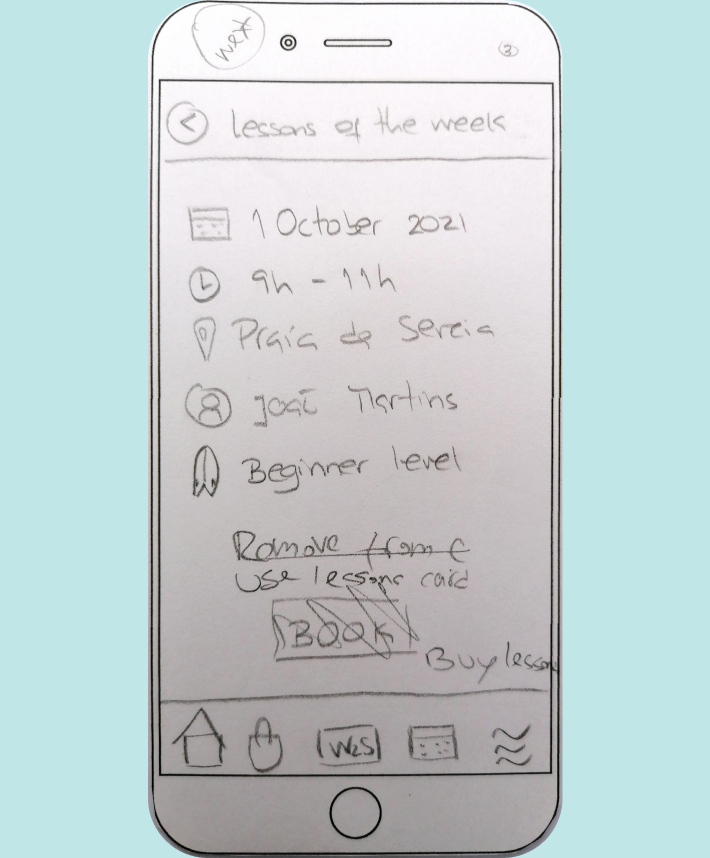
Low-Fidelity Prototype
It was now time to grab pencil and paper and create some Lo-Fi sketches.




Mid-Fidelity Prototype
Using Figma, I've created the mid-fidelity wireframes for the previously defined user flow.


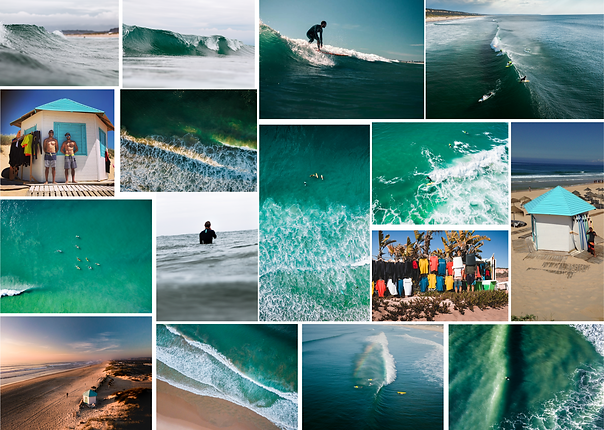
Branding
I created a visual mood board with pictures from the school.
The logo and its variations were already designed and the black and white colors were kept, allowing me to play with other colors for the UI elements.
These other colors - in the blues - intend to recall the ocean, the sky, nature, and calmness.
Developing a UI Kit
I developed a comprehensive UI kit, to create consistency, as well as for developers' hand-off in the future.

High-Fidelity Prototype
Time to put all the pieces together and get to the high-fidelity prototype.


4. Prototype and test
Usability Testing
The prototypes were tested at their different phases (low, mid, and high fidelity).
I aimed to gather first and overall impressions of the app's look and feel and also, understand if the user could complete the proposed tasks (user flow).
The tested users were a mix of the school's students, designers, and other unrelated users.
Tests were conducted individually, in person, and via Zoom screen sharing, using a Figma prototype.


Calendar
For the task of booking a lesson, the user would have to select a date, so I thought about using a calendar, similar to the one existing in the mobile version of the school's website.
The testing showed that clearly, this was not a good approach, as the screen would be too small for so much information.
Additionally, currently, the school just releases the lesson's schedule every 2 weeks, for 2 weeks period, so it didn't make sense to have a whole month displayed, and I came up with a different approach right away at the mid-fi, that had very good receptiveness and was kept on the final prototype.
Lesson reschedule
For the task of rescheduling a lesson, I initially designed it in a way where the user would have to click on a booked lesson on his dashboard and only then click on an "edit/reschedule" button.
Through testing I was able to understand that it would be possible to remove this extra click by having this "reschedule" button directly on the booked lesson card from the dashboard, that would redirect straight away to the selected lesson in the calendar.


Final design
Having done the testing with the users, the final result, for the proposed user flow, can be checked on the video.

Learnings & Next Steps
Throughout this project, it was clear the importance of returning to the users - they really give true valuable feedback - but always keeping my designer eye and critical thinking, as well as always remembering the business needs and constraints.
As next steps I would:
-
keep testing and iterating with more users,
-
develop the features identified as "Should Have's" on the MoSCoW evaluation.
This app represents a very interesting management tool for both students and school owners, and I'm looking forward to see it implemented and continue to expand this project.