Driving action from the storefront


Background
The Mercedes-Benz Storefront serves as a key gateway into the online shop.
Its role is to introduce users to stock vehicles and guide them directly into the search results page (SRP). It needs to give users a clear starting point to explore available inventory, whether through filters, offers, highlights, or essential information about the digital buying journey.
This project began as a B2B effort to uncover the process of company cars purchase, but the insights quickly pointed to broader issues impacting all users, leading us to the Storefront redesign.
Challenge
Redesigning the Mercedes-Benz online Storefront to guide users more effectively into the search results page through clearer navigation, curated content, and improved information hierarchy.
Client
Mercedes-Benz
Timeframe
15 months
Role
UX/UI Designer
Team
Product Management, Product Owner, UX/UI Designer, UX Researcher, Data Analysts, FE Developers
Skills/Tools
User research, data analysis, benchmark, UX/UI design, Figma, Mural, Jira, Confluence
How it all began
User interviews
The goal of the moderated interviews was to get to know the B2B customer needs, their current car purchase journey, their respective role in this journey, and their requirements for future online purchases.
As we were also testing a prototype where the journey started in the Storefront, we had the chance to collect information on the navigation through this page.
Users felt overwhelmed with the filters section and struggled to find simple but essential details.
“There is some information that I would like to get upfront, like what are prices I can get for my company”
“Oh, there is more on the page...But this feels like too much information at first glance.”
We saw room for improvement
We dug into all the information available
Past customer insights studies regarding the Storefront
Other studies that could be relevant
Performance data analysis (click rates, conversion sequence heuristic)
UX reviews of the current experience
Content and layout audits
Benchmarking with automotive and luxury brands
What we learned
1.
Important information was hard to access
Users struggled to find simple but essential details about the digital buying process, benefits, and vehicle availability.
2.
Filters dominated user behaviour
Other content seemed secondary or irrelevant because filters were visually and functionally overemphasised.
3.
The page didn’t feel premium or modern
The repetitive layout and outdated components didn’t reflect the Mercedes-Benz brand experience.
4.
Value propositions were hidden
Trust-building content appeared hidden on the page to be useful.
Always keeping in mind
Business goals
-
Increase traffic from Storefront to SRP
-
Support conversion with clearer communication
-
Encourage exploration of offers and promotions
-
Strengthen brand perception through a premium, modern layout
UX goals
-
Reduce cognitive load
-
Improve clarity & hierarchy
-
Make actions obvious and meaningful
-
Provide valuable information at the right moment
-
Increase engagement with curated content
1. The filters wizard
The problem:
Despite being a very important section of this page, filters were pulling nearly all engagement, leaving the rest of the page ignored:
-
Section longer than the viewport - some filters and the CTA were out of the user’s view.
-
Overload of information presented in a not so digestible way.
-
Difference between car body types was perceived as clear.
-
Vans filters were hidden.
-
Users could apply filters even with 0 cars in stock.

Old filters from the Storefront.

The filters wizard and its navigation.
The mission:
-
Reduce the information overload and make the information more digestible by using a wizard.
-
Present a more visually appealing component.
-
Featuring the 3 most used filters - budget, engine and vehicle type.
-
Filter order from the most general to the more specific to guarantee that there are always results, or a very low possibility of 0 results.
2. More information
The problem:
Users couldn't find the information they valued:
-
Benefits - The value propositions for online sales lacked visibility and affordance (less than 1% of interactions).
-
Process - The information of the car online purchase was considered as important by the users, but the content was perceived as confusing, and its interaction was very close to 0%.
-
Financial options and discounts - information related to these topics was not existing in the page, but mentioned as important by the users.

Old section with the benefits on the top of the page.

Old section with the online purchase process.

"More information" section.
The mission:
-
Display this information in one section, direct and concisely.
-
Offer a glimpse of the information, highlighting the most important.
-
Giving the option for the user to explore more by clicking on the CTA.
-
This CTA takes the user to the respective help page.
3. The recommendations
The problem:
The performance of these 2 sections combined was less than 10%, and we believe it could also be related to:
-
The use of the same visual element in various sections created monotony through the page, not engaging the user.
-
The incorrect use of the component - texts were too long, all cards had a main CTA with the same generic text, an infinite number of cards leading to an endless carousel scroll, and no content curation, having a mix of content in each section that confused the user - Everything everywhere all at once.

Old section with the inspiration content.

Old section with the promoting actions from the moment.

"Our recommendations" section.
The mission:
-
Display both sections' information in one, using an existing visual element from other product.
-
The idea is for content to be reduced, in both description and quantity, curated and more focused - having less but changing more often.
-
Give a teaser to the users, offering a specific action, with clear UX writing of the CTAs - whether to redirect to the shop filtered to particular car models in promotion or other services provided like the online vehicle advice.
4. The specific offers
The problem:
This section had less than 1% interaction - this section was not clear and focused:
-
Once again, there was an infinite number of cards leading to an endless carousel scroll and no content curation.
-
Too many vehicles were being displayed - Why were these bestsellers?
-
It almost felt like all models were presented in the cards, as another filtering entry to the SRP, since the CTA would lead exactly there - What was the value of it?

Old section with the bestsellers.

The mission:
-
Repurpose this section to offer the user something that could add value, directing the user to a specific product page.
-
Display specific vehicles that are in stock, available in the online store.
-
There was already a product working on this component, so we just used it for the moment, to evaluate its performance later on.
"Current offers" section.
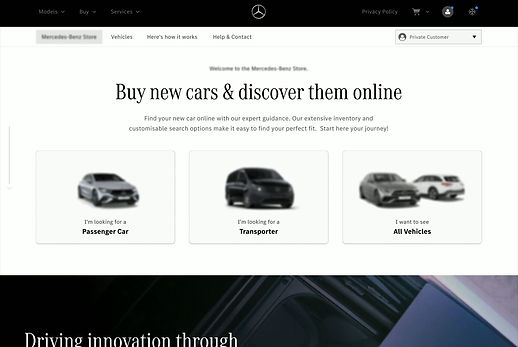
Final design



Impact*
01
Reduced cognitive load.
02
Better information access.
03
Incentive to creation of curated and focused content.
04
Stronger alignment with premium brand expectations.
05
Keeping scalability.
*While metrics are not available, expected impact includes:
Learnings
This project reinforced the importance and the power of user insights, which, even with a different purpose, can trigger important work. Collaboration with other teams and disciplines was key to achieving the best possible outcome, within the development and stakeholders/markets constraints, while also balancing the business needs with the user needs.
I'm not involved in this project anymore, but I would say that after its implementation, with performance tracking and possibly AB testing involved for the filtering section, we will definitely find more details on what can be further worked.